GuestConnect · AI-assisted workflows
Human handoff in a hotel inbox
How GuestConnect’s documented design pauses automated replies, gives staff enough context to take over, and keeps the final send with the operator.
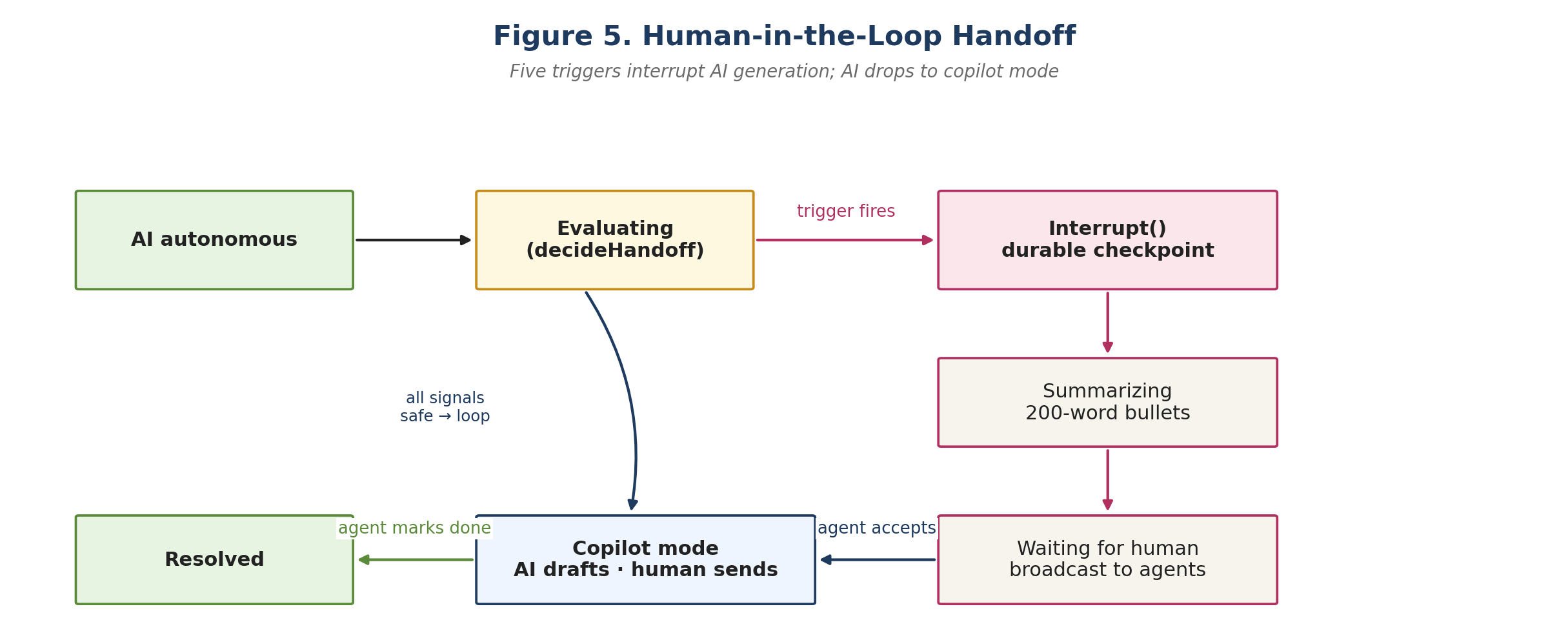
Pause the automatic reply
A hotel inbox has to account for what happens when an automated reply is no longer appropriate. GuestConnect’s handoff diagram shows the system pausing automated sending and preparing a summary for staff. The conversation can still reach the person expected to take responsibility for it.
The pause is the point where the interface needs to make authority visible. A busy operator should be able to see that the conversation is waiting for staff and that automated replies are on hold. Otherwise the operator may be unsure whether responding will duplicate a message already on its way. The case study includes the original handoff figure.
Give staff enough context to act
The three-pane operator console puts a conversation list, the selected thread, and reply tools in one workspace. In the documented inbound flow, Fastify validates the event, PostgreSQL records it under the appropriate tenant, and server-sent events update the console. Background workers handle queued work separately from the web interface.
The summary helps staff orient quickly. The actual thread provides the material they can check before responding. A practical review question is whether staff can distinguish what a guest wrote from what the system inferred and see any newer messages received since the summary. The project case includes the inbound sequence diagram.
Keep the final send with the operator
After a member of staff accepts the handoff, the diagram switches to AI-assisted drafting. The operator decides what to send. The console also includes translation tools, which makes the difference between suggested text and sent text particularly important.
- Automation paused
- Staff need a visible takeover state and access to the conversation.
- Takeover accepted
- The assistant can prepare a draft for the operator to review.
- Reply sent
- The operator chooses the final message and sends it.
Acceptance checks for a handoff
- After the handoff starts, verify that no new automatic reply appears in the thread.
- Accept the handoff and confirm that the suggested response appears as editable text.
- Compare the sent reply with the final text accepted by the operator.
Junyi Qi’s contribution
The case study records Linux runtime and continuous integration fixes, plus participation in a team delivery that included the guest-facing webchat demo and refinements to the operator console. The handoff flow comes from the original project documentation. Read the contribution summary.